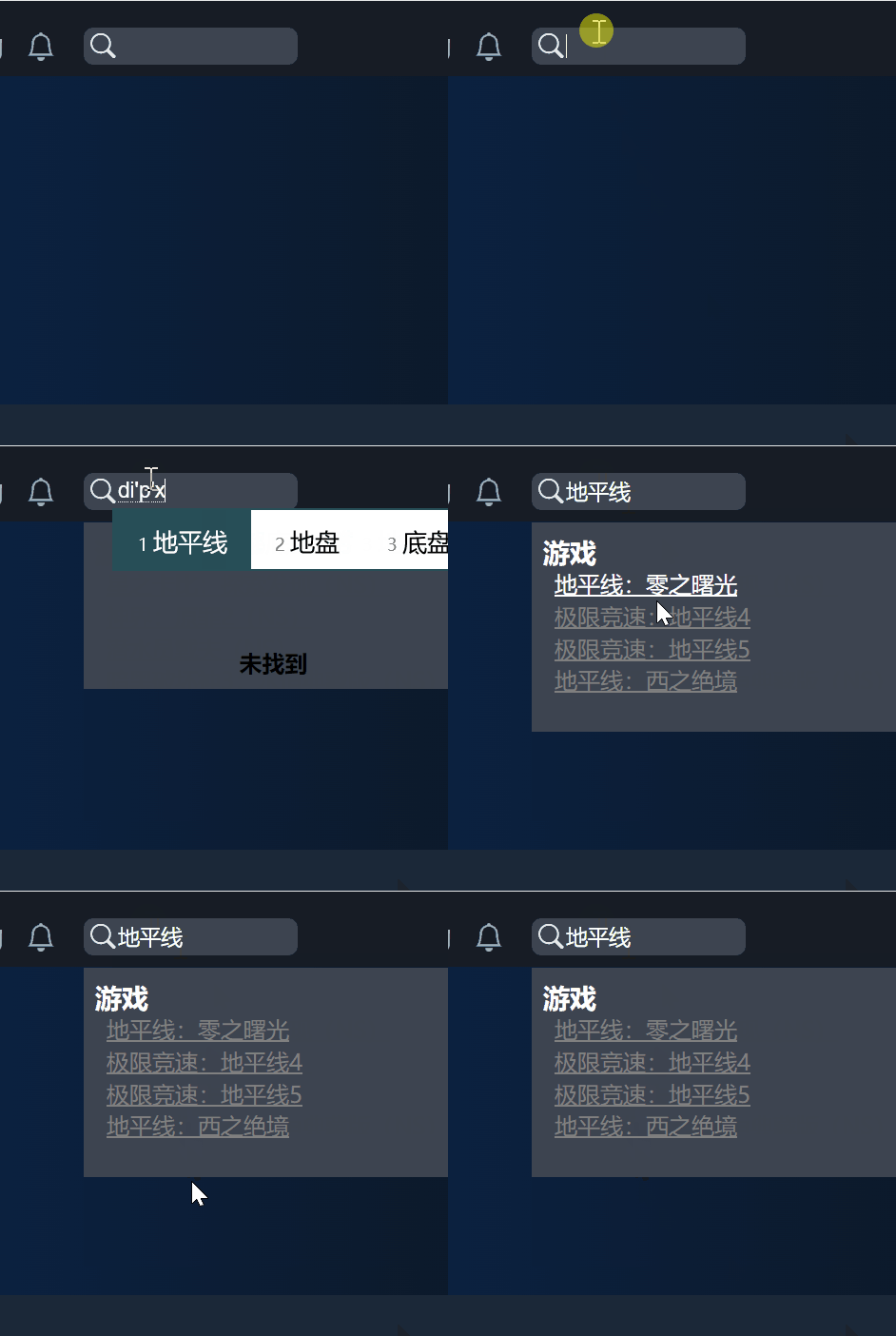
这篇文章快速演示如何使用 js-search, nodejieba(结巴)来在 Electron 中实现中文搜索。
它快速,实时,比你见过的任何一种搜索都快,快到爆浆。
| tech | version |
|---|---|
| electron | 30.0.6 |
| nodejieba | 2.6.0 |
| js-search | 2.0.1 |
本文将带你解决在中国大陆使用 npm 镜像及 nodejieba 可能遇到的一系列问题:
- npmmirror 中的 nodejieba 包不存在或无法下载
- nodejieba 无人维护,不支持在 win11 及 vs studio 2022 版本运行
- nodejieba 不支持 typescript
添加依赖
npm i js-search
npm i nodejieba@2.6.0 --save-optional --ignore-scripts
为什么 nodejieba 要采取这种方式?因为 nodejieba 是用 c++ 编写,而它的社区已经不活跃了。它的编译脚本会失败。我们需要跳过它的脚本,自己编译。
你需要安装 vs studio 2022,并勾选使用 c++ 桌面开发 。
或者使用下面的 powershell 命令,仅安装需要的组件:
Invoke-WebRequest -Uri 'https://aka.ms/vs/17/release/vs_BuildTools.exe' -OutFile "$env:TEMPvs_BuildTools.exe"

& "$env:TEMPvs_BuildTools.exe" --passive --wait --add Microsoft.VisualStudio.Workload.VCTools --includeRecommended
修复 nodejieba
nodejieba 不支持 c++ 17 标准,而修改方法很简单。
你只需要在它编译之前,将 github.com/yanyiwu/limonp 中的 StringUtil_latest.hpp 替换到 nodejieba 即可。
这是一个样例。
const fs = require('fs');
const path = require('path');
const projectDir = path.dirname(path.resolve(__dirname));

const patchFile = path.resolve(projectDir, 'SOME_FOLDER', 'StringUtil_latest.hpp'); // 将 StringUtil.hpp 保存到本地的某个位置,如 SOME_FOLDER/StringUtil_latest.hpp

const dest = path.resolve(projectDir, 'node_modules', ...'/nodejieba/deps/limonp/StringUtil.hpp'.split("/"));
// first install nodejieba with `npm install nodejieba@2.6.0 --ignore-scripts`
// https://github.com/yanyiwu/limonp/issues/34
fs.copyFile(patchFile, dest, (err) => {
  err && console.error(err) && process.exit(1);
})你也可以选择提交到 nodejieba 仓库。我希望中国的开源软件,都能善始善终,后继有人。
修改 package.json
我们仍然希望打包的时候,nodejieba 可以被 electron-rebuild 识别。
"scripts": {
    "preinstall": "npm i nodejieba@2.6.0 --save-optional --ignore-scripts",
    "build:plugin": "electron-rebuild -f",
electron-rebuild 帮你完成 node-gyp 需要做的事情。
为 nodejieba 写一个工具类
拷贝 nodejieba 的字典文件
假设你使用 Electron Builder,该段代码将 node_modules/nodejieba/dict/ 拷贝到安装目录的根目录。
"build": {
    "extraFiles": [
      {
        "from": "node_modules/nodejieba/dict/",
        "to": "dict/"
      }
    ],
不要更改以下代码中的任意一行。
加载本地 node addon 的工具类
import fs from "fs";
import path from "path";
import * as process from "process";
import bindings from "bindings";
// eslint-disable-next-line import/no-extraneous-dependencies
import logger from "_main/logger";
import nconsole from "_rutils/nconsole";
import { dev } from '_utils/node-env';

function loadAddon(pluginName: string) {
  logger.log("preloading plugin");
  let moduleRoot = path.dirname(process.execPath);
  let tries = [["module_root", "bindings"]];
  if (dev) {
    moduleRoot = process.cwd();
    tries = [["module_root", "build", "bindings"]];
    if (!fs.existsSync(path.join(moduleRoot, "build", pluginName + ".node"))) {
      tries = [["module_root", "bindings"]];
    }
  }
  logger.log("using tries: " + JSON.stringify(tries));
  let nodeAddon;
  try {
    nodeAddon = bindings({
      bindings: pluginName,
      module_root: moduleRoot,
      try: tries,
    });
  } catch (e) {
    logger.error(e);
  }
  return nodeAddon;
}

export default loadAddon;
加载 nodejieba 插件
import path from "path";
import loadAddon from './load_node_addon';

const jbAddon = loadAddon("fastx");

let dictDirRoot = process.cwd();
if (process.env.NODE_ENV === 'development') {
  dictDirRoot = path.resolve(process.cwd(), 'node_modules', 'nodejieba');
}

let isDictLoaded = false;

const defaultDict = {
  dict: `${dictDirRoot}/dict/jieba.dict.utf8`,
  hmmDict: `${dictDirRoot}/dict/hmm_model.utf8`,
  userDict: `${dictDirRoot}/dict/user.dict.utf8`,
  idfDict: `${dictDirRoot}/dict/idf.utf8`,
  stopWordDict: `${dictDirRoot}/dict/stop_words.utf8`,
};

interface LoadOptions {
  dict?: string;
  hmmDict?: string;
  userDict?: string;
  idfDict?: string;
  stopWordDict?: string;
}

export const load = (dictJson?: LoadOptions) => {
  const finalDictJson = {
    ...defaultDict,
    ...dictJson,
  };
  isDictLoaded = true;
  return jbAddon.load(
    finalDictJson.dict,
    finalDictJson.hmmDict,
    finalDictJson.userDict,
    finalDictJson.idfDict,
    finalDictJson.stopWordDict,
  );
};

export const DEFAULT_DICT = defaultDict.dict;
export const DEFAULT_HMM_DICT = defaultDict.hmmDict;
export const DEFAULT_USER_DICT = defaultDict.userDict;
export const DEFAULT_IDF_DICT = defaultDict.idfDict;
export const DEFAULT_STOP_WORD_DICT = defaultDict.stopWordDict;

export interface TagResult {
  word: string;
  tag: string;
}

export interface ExtractResult {
  word: string;
  weight: number;
}

const mustLoadDict = (f: any, ...args: any[]):any => {
  if (!isDictLoaded) {
    load();
  }
  return f.apply(undefined, [...args]);
};

export const cut = (content: string, strict: boolean): string[] => mustLoadDict(jbAddon.cut, content, strict);
export const cutAll = (content: string): string[] => mustLoadDict(jbAddon.cutAll, content);
export const cutForSearch = (content: string, strict: boolean): string[] => mustLoadDict(jbAddon.cutForSearch, content, strict);
export const cutHMM = (content: string): string[] => mustLoadDict(jbAddon.cutHMM, content);
export const cutSmall = (content: string, limit: number): string[] => mustLoadDict(jbAddon.cutSmall, content, limit);
export const extract = (content: string, threshold: number): ExtractResult[] => mustLoadDict(jbAddon.extract, content, threshold);
export const textRankExtract = (content: string, threshold: number): ExtractResult[] => mustLoadDict(jbAddon.textRankExtract, content, threshold);
export const insertWord = (word: string): boolean => mustLoadDict(jbAddon.insertWord, word);
export const tag = (content: string): TagResult[] => mustLoadDict(jbAddon.tag, content);

export default {
  load,
  cut,
  cutAll,
  cutForSearch,
  cutHMM,
  cutSmall,
  extract,
  textRankExtract,
  insertWord,
  tag,
  DEFAULT_DICT,
  DEFAULT_HMM_DICT,
  DEFAULT_USER_DICT,
  DEFAULT_IDF_DICT,
  DEFAULT_STOP_WORD_DICT,
};
你应该将该工具类,通过 window 暴露给 renderer 进程,然后 renderer 进程就可以调用这些方法,例如 window.myAddons.cutForSearch.
将 js-search 和 nodejieba 结合
假设你要搜索这样一个对象。
export interface Product {
  [key: string]: any;

  productCode: string;
  name: string;
  namePinyin: string;
  nameEnglish: string;
}
你在搜索的组件中这样写:
import * as JsSearch from 'js-search';
import { Search } from 'js-search';

const [search, setSearch] = React.useState<string>("");
const jsSearchGames = React.useRef<Search>();
const [omnisearch_games, setOmnisearchGames] = React.useState<any[]>([]);
const [omnisearch_loading, setOmnisearchLoading] = React.useState(false);

// ...

// 在页面加载的时候,构造搜索控件和数据
useEffect(() => {
  const buildJsSearch = (uidField: string, documents: any[], ...index: string[]) => {
    const jsSearch = new JsSearch.Search(uidField);
    jsSearch.tokenizer = {
      tokenize: (text) => {
        const r = window.myAddons.cutForSearch(text, true); // cutForSearch 就是上面工具类中的方法
        return r;
      },
    };
    index.forEach((i) => jsSearch.addIndex(i));
    jsSearch.addDocuments(documents);
    return jsSearch;
  };

  jsSearchGames.current = buildJsSearch('productCode', p, 'productCode', 'name', 'namePinyin', 'nameEnglish');
}, []);

// 如果在搜索框中输入了字符,将开始搜索
useEffect((): (() => void) | void => {
  if (!search) {
    return;
  }
  const q = search.trim();
  if (!q) {
    return;
  }
  setOmnisearchGames([]);
  setOmnisearchLoading(true);
  // 清空上一次的搜索,如果还没超过1s的话
  if (currentSearchId.current) {
    clearTimeout(currentSearchId.current);
  }
  const doSearch = async () => new Promise<searchResult>((resolve, reject) => {
    // 1s 之后才开始搜索
    currentSearchId.current = setTimeout(() => {
      const result = {
        sitemap: match_sitemap(q),
        games: jsSearchGames.current?.search(q) as Product[],
        gamesPrecisely: jsSearchGamesPrecisely.current?.search(q) as Product[],
        orders: jsSearchOrders.current?.search(q) as Order[],
        news: jsSearchNews.current?.search(q) as NotificationType[],
        tags: jsSearchTags.current?.search(q) as Tags[],
      };
      resolve(result);
    }, 200);
  });
  doSearch().then((d) => {
    setOmnisearchGames(d.games.filter((p) => p.type !== Constants.API_TYPE_PRODUCT && p.type !== Constants.API_TYPE_GAMEBOX_APP));
    if (d.games.length === 0 && q.length >= 2 && q.indexOf("'") < 0) {
      Object.keys(requests_in_flght.current).forEach((k) => {
        if (q.indexOf(k) === 0) {
          clearTimeout(requests_in_flght.current[k]);
          delete requests_in_flght.current[k];
        }
      });
      // cut q to keep its largest length to 32
      requests_in_flght.current[q] = setTimeout(() => {
        post("/saveRecord", {
          searchString: q.substring(0, 32),
        }).catch(() => {
        });
      }, 5000);
    }
  })
    .catch(openError)
    .finally(() => setOmnisearchLoading(false));
}, [search]);

return (
  <div className="OmniSearch-container">
    {inputElement()}
    {(search_focus || omniMouseOver || null) && search && (
      <aside className="OmniSearch-results-container">
        {(omnisearch_loading || null) && <div className="loading">加载中</div>}
        {((!omnisearch_loading && omnisearch_result_count === 0) || null) && (
          <div className="no-results">
            未找到
          </div>
        )}
        {(omnisearch_games.length || null) && (
          <div className="results">
            <h3>游戏</h3>
            {omnisearch_games.map((e) => (
              <div className="result" key={e.productCode}>
                <Link to={`/productDetail/${e.type}/${e.productCode}`}>{e.name}</Link>
              </div>
            ))}
          </div>
        )}
      </aside>
    )}
  </div>
);
完成
好了,按照这样的思路,你就可以实现下面这种搜索效果了。