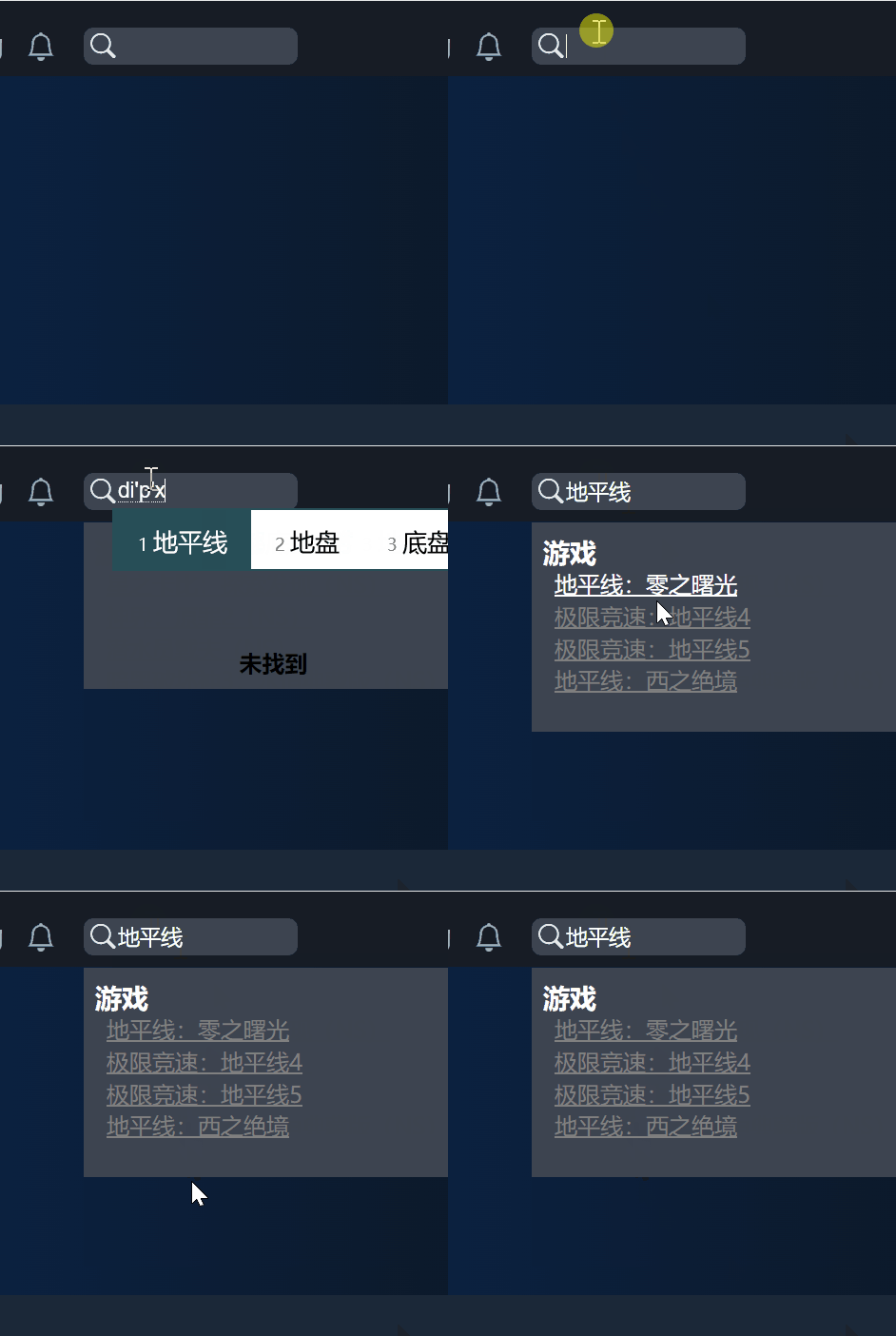
This is a quick demo of how to use js-search, nodejieba to implement Chinese search in Electron.
It’s fast, real-time, faster than any other chinese search solutions, fast like never before.
| tech | version |
|---|---|
| electron | 30.0.6 |
| nodejieba | 2.6.0 |
| js-search | 2.0.1 |
This article will walk you through a number of issues you may encounter when using npm mirrors and nodejieba in mainland China:
- nodejieba package in npmmirror.com does not exist or cannot be downloaded.
- nodejieba is unmaintained and is not supported on win11 and vs studio 2022 versions.
- nodejieba does not support typescript.
Add dependencies
npm i js-search
npm i nodejieba@2.6.0 --save-optional --ignore-scripts
Why does nodejieba take this approach?
Because nodejieba is written in c++ and its community is no longer active.
Its installation scripts will fail. We need to skip its scripts and compile it ourselves.
You need to install vs studio 2022 and check Use c++ desktop development .
Or use the following powershell command to install only the needed components:
Invoke-WebRequest -Uri 'https://aka.ms/vs/17/release/vs_BuildTools.exe' -OutFile "$env:TEMPvs_BuildTools.exe"

& "$env:TEMPvs_BuildTools.exe" --passive --wait --add Microsoft.VisualStudio.Workload.VCTools --includeRecommended
Fix nodejieba
nodejieba does not support the c++ 17 standard, and the way to fix it is simple.
You just need to replace StringUtil_latest.hpp in github.com/yanyiwu/limonp with nodejieba before it compiles.
Here’s a sample.
const fs = require('fs');
const path = require('path');
const projectDir = path.dirname(path.resolve(__dirname));

const patchFile = path.resolve(projectDir, 'SOME_FOLDER', 'StringUtil_latest.hpp'); // Save StringUtil.hpp to a local location such as SOME_FOLDER/StringUtil_latest.hpp

const dest = path.resolve(projectDir, 'node_modules', ...'/nodejieba/deps/limonp/StringUtil.hpp'.split("/"));
// first install nodejieba with `npm install nodejieba@2.6.0 --ignore-scripts`
// https://github.com/yanyiwu/limonp/issues/34
fs.copyFile(patchFile, dest, (err) => {
  err && console.error(err) && process.exit(1);
})You can also choose to create a pr to the nodejieba repository.
I hope that all China’s open source software will have a good start and also a good finish.
Modify package.json
We still want nodejieba to be recognized by electron-rebuild when it is packaged.
"scripts": {
    "preinstall": "npm i nodejieba@2.6.0 --save-optional --ignore-scripts",
    "build:plugin": "electron-rebuild -f",
electron-rebuild helps you do what node-gyp needs to do.
Write a tool to load nodejieba.
Copying nodejieba’s dictionary file
Assuming you are using Electron Builder, this code copies node_modules/nodejieba/dict/ to the root of the installation directory.
"build": {
    "extraFiles": [
      {
        "from": "node_modules/nodejieba/dict/",
        "to": "dict/"
      }
    ],
Do not change any of the following lines of code.
The tool to load a local node addon
import fs from "fs";
import path from "path";
import * as process from "process";
import bindings from "bindings";
// eslint-disable-next-line import/no-extraneous-dependencies
import logger from "_main/logger";
import nconsole from "_rutils/nconsole";
import { dev } from '_utils/node-env';

function loadAddon(pluginName: string) {
  logger.log("preloading plugin");
  let moduleRoot = path.dirname(process.execPath);
  let tries = [["module_root", "bindings"]];
  if (dev) {
    moduleRoot = process.cwd();
    tries = [["module_root", "build", "bindings"]];
    if (!fs.existsSync(path.join(moduleRoot, "build", pluginName + ".node"))) {
      tries = [["module_root", "bindings"]];
    }
  }
  logger.log("using tries: " + JSON.stringify(tries));
  let nodeAddon;
  try {
    nodeAddon = bindings({
      bindings: pluginName,
      module_root: moduleRoot,
      try: tries,
    });
  } catch (e) {
    logger.error(e);
  }
  return nodeAddon;
}

export default loadAddon;
Load nodejieba
import path from "path";
import loadAddon from './load_node_addon';

const jbAddon = loadAddon("fastx");

let dictDirRoot = process.cwd();
if (process.env.NODE_ENV === 'development') {
  dictDirRoot = path.resolve(process.cwd(), 'node_modules', 'nodejieba');
}

let isDictLoaded = false;

const defaultDict = {
  dict: `${dictDirRoot}/dict/jieba.dict.utf8`,
  hmmDict: `${dictDirRoot}/dict/hmm_model.utf8`,
  userDict: `${dictDirRoot}/dict/user.dict.utf8`,
  idfDict: `${dictDirRoot}/dict/idf.utf8`,
  stopWordDict: `${dictDirRoot}/dict/stop_words.utf8`,
};

interface LoadOptions {
  dict?: string;
  hmmDict?: string;
  userDict?: string;
  idfDict?: string;
  stopWordDict?: string;
}

export const load = (dictJson?: LoadOptions) => {
  const finalDictJson = {
    ...defaultDict,
    ...dictJson,
  };
  isDictLoaded = true;
  return jbAddon.load(
    finalDictJson.dict,
    finalDictJson.hmmDict,
    finalDictJson.userDict,
    finalDictJson.idfDict,
    finalDictJson.stopWordDict,
  );
};

export const DEFAULT_DICT = defaultDict.dict;
export const DEFAULT_HMM_DICT = defaultDict.hmmDict;
export const DEFAULT_USER_DICT = defaultDict.userDict;
export const DEFAULT_IDF_DICT = defaultDict.idfDict;
export const DEFAULT_STOP_WORD_DICT = defaultDict.stopWordDict;

export interface TagResult {
  word: string;
  tag: string;
}

export interface ExtractResult {
  word: string;
  weight: number;
}

const mustLoadDict = (f: any, ...args: any[]):any => {
  if (!isDictLoaded) {
    load();
  }
  return f.apply(undefined, [...args]);
};

export const cut = (content: string, strict: boolean): string[] => mustLoadDict(jbAddon.cut, content, strict);
export const cutAll = (content: string): string[] => mustLoadDict(jbAddon.cutAll, content);
export const cutForSearch = (content: string, strict: boolean): string[] => mustLoadDict(jbAddon.cutForSearch, content, strict);
export const cutHMM = (content: string): string[] => mustLoadDict(jbAddon.cutHMM, content);
export const cutSmall = (content: string, limit: number): string[] => mustLoadDict(jbAddon.cutSmall, content, limit);
export const extract = (content: string, threshold: number): ExtractResult[] => mustLoadDict(jbAddon.extract, content, threshold);
export const textRankExtract = (content: string, threshold: number): ExtractResult[] => mustLoadDict(jbAddon.textRankExtract, content, threshold);
export const insertWord = (word: string): boolean => mustLoadDict(jbAddon.insertWord, word);
export const tag = (content: string): TagResult[] => mustLoadDict(jbAddon.tag, content);

export default {
  load,
  cut,
  cutAll,
  cutForSearch,
  cutHMM,
  cutSmall,
  extract,
  textRankExtract,
  insertWord,
  tag,
  DEFAULT_DICT,
  DEFAULT_HMM_DICT,
  DEFAULT_USER_DICT,
  DEFAULT_IDF_DICT,
  DEFAULT_STOP_WORD_DICT,
};
You should expose the tool, through the global object like window, to the renderer process, which can then call methods such as window.myAddons.cutForSearch.
Combine js-search and nodejieba
Assuming you want to search an object like this:
export interface Product {
  [key: string]: any;

  productCode: string;
  name: string;
  namePinyin: string;
  nameEnglish: string;
}
Write the code in your search component like this:
import * as JsSearch from 'js-search';
import { Search } from 'js-search';

const [search, setSearch] = React.useState<string>("");
const jsSearchGames = React.useRef<Search>();
const [omnisearch_games, setOmnisearchGames] = React.useState<any[]>([]);
const [omnisearch_loading, setOmnisearchLoading] = React.useState(false);

// ...

// construct search component and data on load
useEffect(() => {
  const buildJsSearch = (uidField: string, documents: any[], ...index: string[]) => {
    const jsSearch = new JsSearch.Search(uidField);
    jsSearch.tokenizer = {
      tokenize: (text) => {
        const r = window.myAddons.cutForSearch(text, true); // cutForSearch is the method in the tool
        return r;
      },
    };
    index.forEach((i) => jsSearch.addIndex(i));
    jsSearch.addDocuments(documents);
    return jsSearch;
  };

  jsSearchGames.current = buildJsSearch('productCode', p, 'productCode', 'name', 'namePinyin', 'nameEnglish');
}, []);

// start to search if use type something in the search input
useEffect((): (() => void) | void => {
  if (!search) {
    return;
  }
  const q = search.trim();
  if (!q) {
    return;
  }
  setOmnisearchGames([]);
  setOmnisearchLoading(true);
  // cancel last search if duration between this search and last search is less than 1 second
  // this is something you need to consider while user using chinese input method
  if (currentSearchId.current) {
    clearTimeout(currentSearchId.current);
  }
  const doSearch = async () => new Promise<searchResult>((resolve, reject) => {
    // start search after 1 second
    currentSearchId.current = setTimeout(() => {
      const result = {
        sitemap: match_sitemap(q),
        games: jsSearchGames.current?.search(q) as Product[],
        gamesPrecisely: jsSearchGamesPrecisely.current?.search(q) as Product[],
        orders: jsSearchOrders.current?.search(q) as Order[],
        news: jsSearchNews.current?.search(q) as NotificationType[],
        tags: jsSearchTags.current?.search(q) as Tags[],
      };
      resolve(result);
    }, 200);
  });
  doSearch().then((d) => {
    setOmnisearchGames(d.games.filter((p) => p.type !== Constants.API_TYPE_PRODUCT && p.type !== Constants.API_TYPE_GAMEBOX_APP));
    if (d.games.length === 0 && q.length >= 2 && q.indexOf("'") < 0) {
      Object.keys(requests_in_flght.current).forEach((k) => {
        if (q.indexOf(k) === 0) {
          clearTimeout(requests_in_flght.current[k]);
          delete requests_in_flght.current[k];
        }
      });
      // cut q to keep its largest length to 32
      // save those record that returns empty results to server so we can improve
      requests_in_flght.current[q] = setTimeout(() => {
        post("/saveRecord", {
          searchString: q.substring(0, 32),
        }).catch(() => {
        });
      }, 5000);
    }
  })
    .catch(openError)
    .finally(() => setOmnisearchLoading(false));
}, [search]);

return (
  <div className="OmniSearch-container">
    {inputElement()}
    {(search_focus || omniMouseOver || null) && search && (
      <aside className="OmniSearch-results-container">
        {(omnisearch_loading || null) && <div className="loading">Loading</div>}
        {((!omnisearch_loading && omnisearch_result_count === 0) || null) && (
          <div className="no-results">
            Not Found
          </div>
        )}
        {(omnisearch_games.length || null) && (
          <div className="results">
            <h3>Games</h3>
            {omnisearch_games.map((e) => (
              <div className="result" key={e.productCode}>
                <Link to={`/productDetail/${e.type}/${e.productCode}`}>{e.name}</Link>
              </div>
            ))}
          </div>
        )}
      </aside>
    )}
  </div>
);
Done
Well, now you can achieve such a search effect as below.